The live preview allows you to modify your emails and instantly view these modifications on mobile devices and computers.

Using the Live Preview
In addition, you can share a live presentation of your changes to an email with stakeholders, even if they don't have an Email Builder license.

This preview should not be used as a replacement for performing quality control in real-world environments (email clients, webmail services and apps).
Step 1: Click on Live Preview's icon
In the Designer, click on the button 
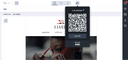
Step 2: Scan the QR Code or copy the URL
Scan the QR code with a mobile device or copy the URL to share.
From your web browser page, enter the PIN code previously displayed in the Email Builder. The email or module currently being edited will then appear with the real-time changes applied.
Live preview validity period
Once the user who generated the QR code refreshes or leaves the Designer, the link is immediately deactivated. A message will indicate that the session has expired.
If a user tries to access an expired live preview link, a 404 page will appear.