In the standard, the CRM delivers two correspondence templates for serial and individual emails.

Correspondence templates with placeholders

Admin: The templates include a set of common placeholders via the loader, which can be adjusted through customizing.
You can use loader formatting to link fields. This makes it possible to link individual fields that you need, for example, for the form of address or a signature, and to remove undesired blanks if not all fields are filled, for example, if the title or name extension is empty. In this way, a placeholder for the CMP name, for example, can be included without the form of address. In this case, the formatting is:
C:CAT: :TIT_NAM,FST_NAM,ADD_FST_NAM,NAM,ADD_NAM
- Email: HTML template with signature (German, PISA)
ID = PSA_RPT_CPD_EML_PLH - Serial email: HTML template with signature (German, PISA)
ID = PSA_RPT_CPD_EML_SER_PLH - Both templates use the Loader
PSA_RPT_CPD_HTM_EML. - In the metadata, the Parameter
TOP_DTO:=CORRESPONDENCEREC_DTO:=PSA_CON_ACT_CLI_SAGrepresents the relations. - PISA is entered as the Tool.
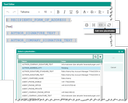
HTM editor with placeholder template and selection
Note: The new editor with placeholder functionality is only available in the web client. The Windows client does not have a new editor.
Please also note the following:
- The placeholder functions are only available with serial and individual emails, not for other activities.
- Placeholder functions are only available for emails with an HTM template. If a non-HTM template (BIRT, WWD) is selected, they are disabled.
- Placeholders are only filled with data from the referenced field. No additional logic can be executed.
- Placeholders can be formatted (text size and color, background color...).
In individual emails, it only makes sense to use placeholders that reference data that is linked 1:1, e.g., project subject, project number, etc. In placeholders based on linked lists, e.g. RECIPIENT_…, only one recipient is selected and entered.
With serial mails, it must be ensured that the content of the HTML text field
- a) is inserted as a text block into the template as before when using non-HTM templates (BIRT, WWD),
- b) represents the entire mail text when using the HTM templates.
- After making changes to the data (e.g., the recipient), you can update already filled-in placeholders by clicking the Refresh icon next to the placeholder selection.
- The Use template function also offers to refresh the placeholders.

Attention: The placeholder selection only offers placeholders that really contain data. If, for example, the automatic creation of a signature is not defined in "My data", then the placeholder [AUTHOR_SIGNATURE_TEXT] is also not displayed for it.
See also: Compact Quick info for the simplified correspondence template (PDF).
As an administrator, you will find additional information here:
- PiSA_sales_Admin-simplified template management (PDF)
- PiSA_sales_Admin--E-Mail-Vorlagen-Tool (PDF, only available in German)