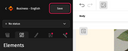
To save an email, click the 'Save' button at the top of the design pane.

How can an email be saved?
1. Saving an email
Once this action is completed, the email is saved.
2. Restoring an unsaved email
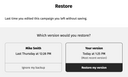
If you leave an email without saving it, you can retrieve the most recent version.
To do this, reopen your email and click on “Restore my version” in the restore pop up that appears.
This automatic backup is stored in your browser caches. If you clear the cache or change the browser, this backup will no longer be accessible.
3. Overwriting a saved email
By saving an email, you replace the previously saved version.
To avoid permission conflicts, please make sure that none of your colleagues (or other users) are working on the same email at the same time.