- Starting point and information pool for all product-related service processes
- Accessible for customer objects or, e.g., via a phone call (CTI coupling)
- Quick search in the form for a customer, operator, or service object attributes
- Entire service history (Chronos) as service file for every system, machine, assenbly, etc., can be viewed

Customer installation
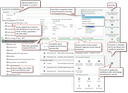
The customer installation shows all actually installed products at a selected customer's.
Important properties and features of the customer installation
- Automatic acquisition of the scope of supply of a finished sales order in the form of a customer installation in the service, including a function for quantity explosion
- Navigation in the product structure of the products installed at the customer's (installation tree, customer as the top node, customizable tree structure, e.g., with an additional object node between the customer and the service object)
- Filtering for all or selected service-relevant products (service objects)
- Query by customer and via attributes like on a service card (model, serial number, etc.), by service object
- Warranty expiry (only service objects), maintenance-relevant parts, third-party or replaced parts are marked directly in the installation tree
- Functions for the initial creation of service objects, service calls and service orders directly from the customer installation
- Functions for updating the customer installation (replacement, addition and deletion of product items) after service measures
- Product history
- Examination of product-related FAQs and trouble codes
- Examination of service data including call and order history
- Access to the customer installation directly from the Service tab of the customer, call, request or contract form
- Various explosion options, e.g., document view (by service object structure, via process, up to the neutral product, …)
- Easy charge split (e.g., 4 components one of which is defective)
Service history (Chronos)
In Chronos as a service file, you will find the history of everything that has happened with the service object in question:
- calls
- cases
- contracts
- activities
- services
- measures
Once you have selected the desired view, you can use the available quick filters and resolution options.
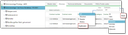
Service history (Chronos), view on contracts