The symbol in the headline indicates the type of the change that has been made.
🚀 – Added feature
🛠️ – Improvement
🐞 – Fixed bug

The symbol in the headline indicates the type of the change that has been made.
🚀 – Added feature
🛠️ – Improvement
🐞 – Fixed bug
See below for new or improved server-side functionality.
PisaSales CRM has been renamed to JustRelate CRM and received a new default color scheme.
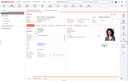
A typical view of the new color scheme
It is now possible to have more than one external view open at a time. So in addition to the main window, you can open
at the same time.
You can activate or deactivate this feature in the Customize view dialog.
If an overview list has an active filter, then the filter name is used as the list's title in its main tab. This way, it is easier to distinguish simultaneously opened overview lists.

Form fields, for which a query condition is currently set, are now highlighted with a colored frame.

A form field (“Save as”) with an active query condition
You can activate or deactivate this feature in the Customize view dialog.
A new function allows you to quickly reset dialog settings to their defaults. This affects hidden or moved columns, hidden tabs and quick filters.
Especially quick filters, which persist their state, sometimes confuse inexperienced users who may miss data next time they open a specific object, e.g., a sales case.
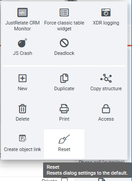
The new “Reset” function in the hamburger menu
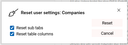
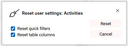
The “Reset” dialog of an “Activities” sublist dialog
Using the new “Reset” function, you can select the properties to be reset to the default.
Note that only available settings are offered for resetting. If a dialog has no subtabs, then subtabs are not shown in the “Reset” dialog.
The application server can instruct the client to perform a dialog reset on server request.
For this, the new client command DLG_CLN was introduced. This client command supports a “force” flag. If it is set, then the reset operation will be executed by the client without any user interaction.
The application server can use this client command for a dynamically created INI tag, for instance.
If a table cell contains a hyperlink, it can now be triggered using the hotkey [Ctrl]+[Enter] if the cell is focused.
It is now possible that the application server instructs the client to switch a data field to “mandatory” mode.
In the past, this mode could only be set during dialog initialization. This restriction was removed, so that the application logic can switch a data field to “mandatory” mode at any time during dialog's life cycle.
Message boxes now support some HTML tags for formatting the message text.
In order to activate this HTML support, the message text must begin with the prefix {{{HTML}}}.
The message text itself must be an HTML fragment, i.e., it must not be a full HTML document.
Note that images and scripts are not supported! All unsupported HTML tags are silently removed.
The server now needs at least Java 21 to compile and run.
Theoretically, the older JustRelate CRM versions (e.g. 8.3) could also run with Java 21. The only thing that does not work anymore is stopping a thread manually. This will cause an UnsupportedOperationException.
In the appointment form, you can open a selection dialog for the location. This dialog showed you the addresses of all contacts that are assigned to this appointment.
Now this dialog also shows you the location of assigned projects and service objects.
The mailing list subdialog of contacts now shows the status-based context of the mailing list. This means that inactive mailing lists are displayed with red text color.
However, if the contact is assigned multiple times to the list, the duplicate context “wins”, and the record is displayed stroked in red.
Resolved in 8.3 Patch 03
When configuring the questionnaire action “Create task” you can already define the subject in multiple languages by editing the parameter by hand: TIT_GER:=Betreff TIT_ENG:=Subject
But the configuration dialog will “destroy” this configuration and set TIT:=Betreff again after you modified the configuration.
As a fix, the title in the languages that are not the user language will be copied to the new parameter
Resolved in 8.3 Patch 3
Previously, the connect and read timeouts were both set to the same value defined in the property psc.rst.def.tio. But especially a long connection timeout can cause the application to hang in case of a network problem.
The new properties psc.rst.def.tio.con (connection timeout) and psc.rst.def.tio.rea (read timeout) define each of the default values individually. They can be overridden by the values set in the PscRstAut parameter. If nothing is configured, the default for the connect timeout is set to 10 seconds. The read timeout stays at 5 minutes.
Resolved in 8.3 Patch 3
LinkedIn supports the company name in the person search. With the company name, the search result is more specific.
The new placeholder <<company>> in the URL is replaced by the company name.
The new URL pattern for LinkedIn is https://www.linkedin.com/search/results/people?firstName=<<first name>>&lastName=<<last name>>&company=<<company>>
If an exception (due to, for example, a broken database connection) occurred while the job class was being loaded, the job deactivated itself and had to be activated again manually. And, if an exception occurred during the execution of the job method, the job remained active and tried to execute the next time again.
Now, an exception occurring while the class is being loaded will no longer stop the thread.
Resolved in 8.3 Patch 3, 8.2 Patch 17, 8.1 Patch 30.
If you do a query where you search for 3000 GIDs with OR in PSC_GID, you may get an exception from the database. (It depends on your database how many search terms you can use.)
We created a new message, PSC_DBI_SQL_MAX_PAR, with the text "The maximum number of search conditions has been exceeded!". For the three databases, Oracle, PostgreSQL and Microsoft SQL this message is thrown if the limit of maximum parameters was reached.
Resolved in 8.3 Patch 3, 8.2 Patch 17
The variable PSA_DPR_RST_SVC_URL defines the URL to the GDPR page. This URL does not depend on the language of the recipient.
The communication language identifier is now added to the variable PSA_DPR_RST_SVC_URL (e.g. PSA_DPR_RST_SVC_URL_FRA). If this language-specific variable is not set, the basic variable PSA_DPR_RST_SVC_URL is used.
In a basic use case, you would define the URL to the English page in PSA_DPR_RST_SVC_URL. For every other language, you would define new variables.
Resolved in 8.3 Patch 4, 8.2 Patch 18
In the admin toolbox, administrators can now open a new wizard that helps configuring the connection to other JustRelate products. It configures the IAM credentials and the settings necessary to access Neoletter, NeoDXP, the Planning Board, and the Portal. Also, the required jobs are started:
Resolved in 8.3 Patch 4
If you merge two internal persons each of which has a groupware configuration, the master records should only have one groupware configuration after the merge.
If the master had a configuration, then the configuration of the duplicate is deleted. If only the duplicate had a configuration, this configuration is now the configuration of the master.
Resolved in 8.3 Patch 4, 8.2 Patch 18, 8.1 Patch 40
Before this change, the form data could only be imported as a lead for a project or as questionnaire answers. Now both are possible. And even multiple questionnaires are supported.
If the project custom field is set in the form data and the referenced project is found, the form data will be imported as an activity and a person as before. If the project is not set, it depends on the job parameter FRC_PRO whether the activity and the lead will be created.
Then the assignment of the form to the questionnaires is checked. If there are assignments found, the form data will be imported as questionnaire answers. If a project was found in the first step, the project will be assigned to the answers. The same is true for the activity and the person.
If the activity and the person were not created, depending on the job parameter IMP_QST_LEA, the activity and person are created only for the answers. As a last attempt, if the person is not defined, it is checked if the email address is related to exactly one contact. Then this contact is assigned to the answers.
Resolved in 8.3 Patch 4
The portal only shows a limited data set based on the access rights of the portal user. But the search uses the EUREKA index which searches in all fields of the records. This is problematic if a user searches by brute force for interesting terms. By finding or not finding a record, an assumption of the data can be made. Or in the text snippets of the found records you may see data you would usually not see in the portal.
In order to deal with this problem a new field was added to the EUREKA index that only indexes the data visible in the portal. The portal now uses this field for searching and all other EUREKA searches continue using the old index field.
For an existing index the new field is empty and will automatically fill the data for records that are created or updated.
In order to update all records, delete the existing index and create it from scratch. Alternatively, index only the affected data objects in the index. To do this, set the last update date of the object to $NONE.
The variables of the objects concerned are:
PSA_FUL_IDX_DAT_PSA_CTRPSA_FUL_IDX_DAT_PSA_DOCPSA_FUL_IDX_DAT_PSA_PRO_MKTPSA_FUL_IDX_DAT_PSA_PRO_SALPSA_FUL_IDX_DAT_PSA_SVCPSA_FUL_IDX_DAT_PSA_SVC_ARTResolved in 8.3 Patch 4, 8.2 Patch 18
The response job (PSA_EXT_EMA_RSP) imports the response and the preview for each mailing sent in a configured time, or that are unsent. However, if the mailing is not found (for example if it was deleted in Neoletter), JustRelate CRM queried the mailing forever with every job run.
If Neoletter now responds that the mailing is not found, the link to Neoletter is removed. This will prevent the job from processing the email again.
In Neoletter, you can define a transactional mailing including the subject, pre-header and template. With the Neoletter API this mailing can be send to a recipient.
The JustRelate CRM API for Neoletter now has new method that can send such a transactional mailing.
Resolved in 8.3 Patch 5
The problem occurred if the dialog or data object was in edit mode, and the modal language dialog for the title was then opened. After confirming the language dialog, the implementation (if present) was removed.
This was caused by an internal copy operation.
Resolved in 8.3 Patch 5
If two internal persons were merged, the cockpit configuration was also transferred to the master person. The problem that arose was that the master person then had a cockpit configuration duplicate, and the elements may have been displayed incorrectly as a result.
Resolved in 8.3 Patch 5
For the objects you also have in NeoDXP, there is a function in JustRelate CRM that opens the current record in the NeoDXP UI. This function is named “Open in NeoDXP” and is available in the forms of companies, persons, the different activity types, sales cases and the service calls.
This feature needs to be configured. The first thing to set is the URL of the NeoDXP UI in the variable PSA_NEO_DXP_GUI_URL, for example to https://edit-neocrm.justrelate.com/i/{instance} where {instance} is the the instance ID of your JustRelate Web Builder tenant.
There is also a function named PSA_OPN_NEO_DXP that defines who can see this feature. In the standard configuration, no one (except admins) can see this function. To change this, the access needs to be changed. The most simple way would be to remove the access restriction in order to grant access to everyone.
If you use the JustRelate Platform Connection wizard, both settings are taken care of for you.
Resolved in 8.3 Patch 5, 8.2 Patch 19
Only the user who posted a message was able to delete it later. But in case a message needs to be deleted (for example one that is shown in the portal) if the user is not available, it requires some effort to do this.
Now, a JustRelate CRM administrator (access group 43) is also able to delete messages from all users in the pinboard.
Resolved in 8.3 Patch 5
In JustRelate CRM, social networks that are no longer in use (Google+, ICQ and Skype) can be configured.
Instead of deleting these records, the “active” flag was added to the admin list. An inactive record can no longer be selected, but existing entries of such a social network are still shown at the contact. The three networks mentioned above are marked as inactive in the standard.
In the past, customers could host a static website that communicates with JustRelate CRM in order to display and change the GDPR consents for an external person.
Now it is possible to use the more powerful Web Builder to build such a page.
In order to activate this feature, set the variable PSA_DPR_RST_SVC_URL_JWT to y. This will generate a JWT that is added to the URL defined in PSA_DPR_RST_SVC_URL for authentication. The token is valid for a limited period of time. The duration is defined in the variable PSA_DPR_RST_SVC_URL_JWT_EXP_TIM and defaults to one day. The token can be used for the gdpr endpoints of the portal API.
As before, you can configure the page that the link should open in the variable PSA_DPR_RST_SVC_URL. However, it is now also possible to define a language-dependent URL. To do this, add the language identifier to the variable name. So, for example, PSA_DPR_RST_SVC_URL_GER would refer to the German-language page.
Resolved in 8.3 Patch 3, 8.2 Patch 17
If you put implementations (IPL or DYN_JAV) into the global cache PsaGlbChe, getting them out again might throw a ClassCastException if the class loader was changed in the meantime. This happens for example if an already loaded implementation is changed.
You could handle the exception on the side of the caller, but forgetting this causes problems at runtime. It also uses the same boilerplate code over and over again:
The PsaGlbChe class now has a new method that handles this problem internally.
Before the cast, this methods checks if the classes are compatible. If not, the entry is removed from the cache and null is returned. This works well with lazy cache initialization, when the cached value is null.
So the code from above will now look like this:
Resolved in 8.3 Patch 6, 8.2 Patch 20
It was already possible to prevent empty user passwords. In the variable PSC_PWD_VRF_PAT, a regular expression could be defined that must be matched when the password was changed.
However, an administrator could clear the password in the user administration. This may cause a security issue depending on how the login is secured.
Now, when saving an empty password, it is changed to the "magic string" NOPWD that basically locks the login for this user.
Resolved in 8.3 Patch 6, 8.2 Patch 20, 8.1 Patch 41
With new pinboard posts, the email notification for external portal users only supported mailings based on Web Builder templates .
Recently, Neoletter introduced transactional mailings that are more user-friendly. As a result, notifications can now also be issued by placing the ID of a transactional mailing in the PSA_PIN_BRD_SND_EMA_TPL_ variables.
Note that placeholder names in templates require the custom_ prefix! In Web-Builder-based templates it was a bug that this prefix was not needed. So please check your templates before migrating to transactional mailings.
Resolved in 8.3 Patch 6
When a person is created and assigned to a company, its account manager is now set as the new account manager of the person, whether you are using drag & drop, the company field in the person header, or the employee list.
Previously, the contact group was only changed if the company was assigned in the header of the person form.
Now this is also applied in the company list of the person and in the staff list of the company.
If a notification email is sent in the event of a new message having been posted, this email can now include a direct link to the ticket concerned. This allows the recipient to access the referenced ticket more easily.
There are variables for defining a URL for each ticket process. The variable names have the prefix PSA_PIN_BRD_SND_EMA_URL_ and work similar to the other PSA_PIN_BRD_SND_EMA% variables.
The URL can contain placeholders like <PSC_GID> for retrieving ticket-specific data. If a URL is defined for the process, it will be added as the url custom field.
The URL can be language-dependent based on the communication language of the recipient. Just append the language identifier (e.g., ENG or GER) to the variable name.
This feature also works for other processes that use the pinboard, e.g., sales cases.
Resolved in 8.3 Patch 03, 8.2 Patch 17
Three new profile groups were created to control access to the test case module.
PSA_TCM [4000010]: ViewPSA_TCM_MST [4000012]: MasterPSA_TCM_ADM [4000014]: AdminFor everything in the admin menu, you require the admin profile.
A new menu entry under "Extras" for the test cases (releases) was added. This menu entry requires the view profile. For a user who only has the view profile, everything in this dialog is read-only. A user with the master profile can add test results.
Activities created by a questionnaire action can now set the due date for the new activity. The action configuration dialog shows a new field for this:
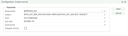
You can use $TIME macros with an offset, but for some internal reasons you need to add a second $ prefix.
The format is $$TIME[+|-]#[s|m|h|D|W|M|Q|Y]
The modifiers have the following meaning:
s: secondsm: minutesh: hoursD: daysW: weeksM: monthsQ: quartersY: yearsExample: $$TIME+1W is now in one week.
When you copy the watchlist element in the cockpit element administration, you now get two independent instances of this element. In the past, both elements shared the same configuration and therefore the same filters. Adding them to different cockpit pages showed the same data on each page.
Now those copies are independent of each other so that you can have different filters on different pages.
When the email address of a contact was changed, the old email address stayed the same in all existing relations to mailing lists. This is because you don't want to change the history stating under which email address the contact was addressed. Also, the email address could be modified manually for a specific mailing list.
Updating the email addresses involved a lot of manual work because you had to open each mailing list, find the contact, and then refresh the email address.
Now, in the mailing list tab in the contact form, there’s a new button, "Refresh e-mail...", that updates the email address for all selected relations.
When you merged two contacts, the "number", "contact since" and "join date" fields were always reported as conflicting. However, the most common use case is that the data of the master is kept.
By ignoring these fields during the merge, fewer or no conflicts at all are reported to the user, which is more user friendly due to the reduced amount of unnecessary information.
Under My data/Additional data/Foreign calendar, a new import function is available. It imports all events from the external calendar as new appointments. Once the import is finished, all imported appointments are opened together in a single dialog.
Resolved in 8.3 Patch 9
If you want to adjust the logic of how a product’s price is calculated, you now can control this across multiple fields.
The procedure follows the same principle as the “standard” calculation: link the data object PSA_CLC and override the relevant methods.
For each field, you have multiple methods,
Production costs (LST_PRI): clcArtLstPriWthSurAbs, clcArtLstPriWthSur, setArtLstPri
Production costs without surcharges (LST_PRI_MIN_SUR): clcArtLstPriMinSur, setArtLstPriMinSur
Surcharge (SUR): clcArtSur, setArtSur
Surcharge, absolute (SUR_ABS): clcArtSurAbs, setArtSurAbs
Resolved in 8.3 Patch 9, 8.2 Patch 23
Previously, JustRelate CRM could reject the release of an appointment in the Planning Board if a conflict was detected. This often led to the two systems holding different statuses for the same appointment.
Now, the Planning Board is considered the master system since it also checks for conflicts and warns the user. If the user still chooses to release the appointment, JustRelate CRM will follow and release it as well.
Resolved in 8.3 Patch 9, 8.2 Patch 23, 8.1 Patch 45
This affects these three elements:
Watchlist
Filter diagram
Filter bar diagram
An option has been added that allows the values of these elements to be displayed as the average value instead of the sum.
In the configuration settings for each element, you will find a checkbox that enables aggregation by average.
When BIRT generates DOCX files, they are displayed properly in the Word App, but importing them into Google Docs causes problems:
A post processor for the BIRT engine was implemented to fix the document after it has been generaated. The individual fixes can be enabled by a template parameter, a variable or a session value buffer.
Multi line text shows only one line
The text in <w:t> contains line breaks with <w:br/>. Changing this to multiple <w:r> with a single line in <w:t> fixes this issue.
Template parameter: DOCX_LBR:=y
Variable & value buffer: PSA_BIRT_RPT_DOCX_LBR = y
The column width is ignored (all columns have the same width)
Changing the width definition from <w:gridCol w:val= to <w:gridCol w:w= fixes this issue.
Template parameter: DOCX_COL_WID:=y
Variable and value buffer: PSA_BIRT_RPT_DOCX_COL_WID = y
Before this change, the link in the Planning Board from a resource opened the resource form in JustRelate CRM. However, for person resources, you most likely want to see the person's data.
Now, the link of a person resource opens the person's form in JustRelate CRM.
The new link for the resource is generated when the resource is modified or inserted. Alternatively, you can export all resources with the help of dynamic Java, PSA_PLB_EXP_RSC.
JustRelate’s Web Builder questionnaires can now be accessed without IAM authentication, making them more accessible to a wider audience. Instead of using IAM for authorization, a JWT (JSON Web Token) is now used to grant access.
For each questionnaire, you can assign multiple URLs that refer to a Web Builder page. This URL is automatically set when the Questionnaire Builder creates or updates a questionnaire.
You can also set a language for each URL. The server first tries to find a URL with the recipient's communication language. If no URL is found, the one without a language is used.
You can generate the link to the questionnaire with the help of an email template. First, create an email for the person you want to send the link. Then, select the "E-Mail Single: Sample HTML with questionnaire URL (English, BIRT)" template. A selection dialog will open where you can select the questionnaire. You can only select questionnaires that have a configured URL.
Then the server will generate a URL containing a JWT that is later used for authorization when the answers are stored. This URL is added as a link in the mail body. The token is valid for one day. This time can be adjusted through the variable PSA_QST_RST_JWT_EXP_TIM.
If you're creating your own email templates, make sure to include the QST_URL:=y parameter, as this triggers the selection of the questionnaire when generating the email content.
When the questionnaire sends the entered data to JustRelate CRM, the JWT is used to identify the associated contact, activity and project. The owner of the answer records is the user who created the link.
For JustRelate CRM 8.2 and 8.3, the PSA_FEA_QST_JWT loader needs to be imported in order to get the necessary repository data. You can find the loader file in the modules folder for your specific label of the JustRelate CRM server in GitHub. After importing this loader, please create the PSA_QST_URL data object manually.
Version 8.4 still contains the Lotus Domino Groupware connector, however, it is deprecated and will be removed in a future version.
In the resource type administration, you can assign an icon to each type. If the icon is stored as a PFD BLOB containing a FontAwesome symbol, it will be included when exporting resource type data to the Planning Board.
If a type has already been exported, it will not be updated automatically, and therefore the icon will not be exported. However, by using the dynamic Java class PSA_PLB_EXP_RSC_TYP, an administrator can trigger a full re-export of all resource types.
When an appointment’s status is set to “Canceled”, all associated resources are removed from it in the Planning Board.
If the status is later changed from “Canceled” to any other status, the resources are restored. However, attendees who previously declined will not be added back.
When leads are imported from Neoletter, the server attempts to determine the person's gender. It checks existing persons and uses the most likely match.
This feature can be disabled using the variable PSA_PRS_FND_SEX.
The PSA_CRE_CTR_APM job creates service appointments. Previously, the agent assigned to these appointments was the same as the job user, unless an agent was specified at the product level within the scope of delivery.
Now, the generated appointments are created without any agent assigned.
Resolved in 8.3 Patch 12
Changes made in the Planning Board are imported into JustRelate CRM by a job. Previously, these changes were applied under the job’s session user, which was typically “salesadmin”.
Now, the Planning Board provides information about the actual user who performed the change, allowing the server to import the updates under the correct user account.
In the follow-up appointment form, the Begin, End, and Location fields had different labels, and the button for selecting a location was missing.
The field labels have now been standardized to match the main form, and the location selection button has been added.
When creating an email series and assigning a mailing list, the list is not expanded immediately. It is only expanded during an export (e.g., to Neoletter). Previously, the pre-export error check only verified the direct recipients, not those in the mailing list. While the export process performs an automatic error check for the expanded recipients, you might want to see the results beforehand.
Now, the check function expands the mailing list in advance.
Resolved in 8.3 Patch 12, 8.2 Patch 26
Previously, the update ran silently. Now, a message is displayed showing which contact’s email address was changed and to which value.
Resolved in 8.3 Patch 12, 8.2 Patch 26
The list lets you edit entries and view more details compared to the tree without requiring a manual switch.
When creating a follow-up appointment or call, you usually want to involve the same contacts.
Now, the contacts are automatically copied. This feature is enabled by default but can be disabled using the variable PSA_FLW_ACT_CPY_REL. To do so, set the parameter CON_APM_CAL to N.
If the gender was not set during the contact import, the server now determines the gender based on the existing persons.
In case a job is stopped (for example by an error), you may want to receive a warning so you can restart it.
You can now enter a URL in the job configuration. This URL will receive an HTTP GET request after the job completes. Using a service like Honeybadger, you can trigger an alert if this request is not received within a specified time.
Resolved in 8.3 Patch 13, 8.2 Patch 27, 8.1 Patch 47
Since logging tables are usually read-only, they don't need a lock flag or access control. These flags may have a negative impact on functions like "Clear locks" depending on the number of records in the tables.
The lock flag was removed from these data objects: PSA_CTI_CLL_LOG, PSA_DPR_LOG, PSA_EMA_LIS_SUB_LOG, PSA_JOB_LOG, PSA_JOB_LOG_DAT, PSA_RST_API_LOG
The access flag was removed from these data objects: PSA_CTI_CLL_LOG, PSA_JOB_LOG, PSA_JOB_LOG_DAT, PSA_RST_API_LOG