The symbol in the headline indicates the type of the change that has been made.
🚀 – Added feature
🛠️ – Improvement
🐞 – Fixed bug

The symbol in the headline indicates the type of the change that has been made.
🚀 – Added feature
🛠️ – Improvement
🐞 – Fixed bug
If you want to evaluate from which campaign a lead came or which leads are "cost per click" you can use the additional classification of activities.
We have a new list (Administration > Activities > UTM classification) where you can select an (additional) activity classification. For a classification you can declare the values for the UTM parameters that have to match. If they match this classification is added to the activity.
Multiple classifications can match.
But at least one UTM parameter has to match.
In the filter bar chart you can compress dates to the year, month or quarter. Now you have the additional option to compress dates to the calendar week.
The title is then week.year
This is fixed by iterating over the price lists instead of loading them all at once.
8.1 patch 23
8.2 patch 1
If you tried to drag and drop a mail in the mailbox from the SENT folder to another folder you received an error message. Google does not allow the removal of the SENT label through the API. To handle this, the mail is copied to the target folder instead. Or in terms of Google the target label is added to the mail.
The owner of a record has not created journal entries for his own records. This causes problems if the owner modified the record after another user has made his modifications. Then the journal would only replay the changes of the other user and the modifications of the owners were lost.
If you tried to create an appointment series which generates all appointment records at once and this series also generates a Google Meet for each individual appointment you ran into an error.
The problem was that the appointment needs to be synchronized with Google in order to create a Meet for it. But during the creation of the series this was too early. So synchronization and the Meet generation was moved to the end of the transaction.
If you import a mail from Exchange the category "PisaSales CRM" is always set. To have more control the existing variable PSA_SYN_EMA_SET_CAT now also controls if the category is set in case the mail is synchronized with Exchange.
8.1 patch 24
8.2 patch 2
When you have a company with a service object and you create a new service call or service case, a selection of service objects should open after you save the new record. This feature did not work anymore but is now fixed.
8.1 patch 24
8.2 patch 2
This job currently imports all subscribers of all Neoletter forms as tasks and contacts. This creates a lot of data within the CRM lead management without any real benefit. One way to filter these imports is to assign the form to an event or publication. The job may then only consider registrations from forms that have a project assignment.
If the job sets the parameter FRC_PRO:=y only form submission where the form is associated with a project will be imported.
This way you can for example import lead from a given number of landing pages. All other forms which may be some kind of internal questionnaire for example will then be ignored.
8.2 patch 2
If you let the objects generate timestamps in ISO format by either using the PsaRstApiIsoDat annotation or the global property in the object itself you now get a string that has the Z as last character to indicate that this is an UTC format.
If you want the String without the Z you can set timezone=false for the annotation or define this in the global property.
The Neoletter form type is now transferred to the PisaSales lead import. As part of the customizing this type can be used to do some sort of filtering or special handling of the form submissions during the import.
A bug was fixed where the last used objects were always stored in German language. This happened to records that have a multi language name field like activities or documents.
8.2 patch 3
Bug fixed where private entries of other employees are shown with all data in the personal calendar.
8.2 patch 3
A direct telephony integration with Microsoft Teams is not possible. You have to integrate the phone system you are using for Teams. We verified this integration with sipgate. The connector for sipgate already exists in PisaSales and we are able to receive notifications about incoming calls and to start outgoing calls. Teams behave in this scenario like a softphone. For example starting an outgoing call from PisaSales lets Teams ring and you have to pick up to start the actual call.
A bug was fixed where the begin time of activities changes when they are created as a series and the server has a different time zone than the client.
This was the case if daylight saving had a different definition. For example UTC vs. Europe/Berlin.
8.2 patch 3
8.1 patch 25
If Neoletter defines a form type, this type can be used as the classification of the lead activity. This allows a better grouping of the different form submissions during reporting/analysis.
The form type is searched as the name of an activity classification. This is done for the top classifications as well for additional classifications. If the name is found the classification identifier is set at the activity.
8.2 patch 4
If you let the contract start in the middle of the month and not at the first, the price of the generated orders is wrong. In a monthly invoice interval the total sum of the generated orders is doubled.
8.2 patch 4
8.1 patch 26
Implementations and dynamic Java have a comment line with a timestamp when the code was changed. Also who has changed the code is in the comment. But both comments were formatted differently. Now they have both the same format:
// Last update by user SALESADMIN on host WSAMZN-GCNRJ0KM at 20231027115912
8.2 patch 4
The selector filtered all configurations where the user has no access to. In the case that there are more than 100 configurations only the readable configurations in those 100 records are shown. With this fix up to 100 readable configurations are loaded.
8.2 patch 6
8.1 patch 28
When you create an appointment series for a route you get multiple message boxes asking you if you want to delete other appointments of the series. The problem was that the contact was added to the subject which triggered a recreation of the series.
8.2 patch 4
If doublets are merged the n:m relations with the same father and child are reduced to one. This may lead to a data loss of information that is stored on the relational record. For example the attendee status in an appointment or the role in a campaign.
The doublet merge has a set of data objects and fields that are checked during merge. If the data is different, the relation is not deleted.
Entering bank account information for a company forced you to enter the account number, bank code, IBAN and BIC.
Now only the IBAN is mandatory. And bank name, bank code and BIC have a selector that allows the entering of free data.
8.2 patch 4
8.1 patch 26
8.0 patch 25
If you disabled the access check on a data object with the method PsaSsn.setDtoAccChk(false) you may have afterwards the state that all data objects, that are stored in the cache while the access is disabled, have a disabled access check until the server cache gets cleared.
8.2 patch 5
8.1 patch 27
8.0 patch 25
7.6 patch 31
The access token was cached for each session. But a job gets a session from the session pool and the token is removed from the session cache as soon as the session is returned to the pool. So a job that runs every minute will request a new token every minute.
Now the token is cached for the whole server process and all code uses the same token. Also the token is created with a valid time of 1 hour instead of the 15 minutes before.
8.2 patch 5
8.1 patch 27
8.0 patch 24
Google changed the default value for the event types when fetching the calendar events. They now include the working location events.
We now set "default", "focusTime", "outOfOffice" as event types during the query. Ignoring "workingLocation".
If an employee has left the company you will not find him anymore in the quick contact search in the calendar. If you need to find him anyway you have to use the search dialog.
If you had a PSC_IPL that calls a PSA_DYN_JAV directly without reflection it may happen that during compilation of the PSC_IPL the class file of the PSA_DYN_JAV gets stored as BLOB. That led to the problem that an old version of the PSA_DYN_JAV got loaded by the class loader even if you changed the source code afterwards.
8.2 patch 6
8.2 patch 28
The questionnaire was assigned as soon as it was answered. But the assignment was only done as n:m relation and not as the main project.
But when you created a follow up activity of the appointment suddenly the questionnaire became the main project if the appointment had no other main project.
Now the questionnaire is not assigned anymore to the initial appointment.
New job "Neoletter: Synchronize profiles" (PSA_NEOLETTER_SYNC_PROFILES) that reads the profile events from Neoletter.
For each profile a person with a matching email address is searched. Then the changed values are stored in the data object PSA_MOD_DAT for each field. The account manager of the person received a message that he should check the changes. In the person's dialog the user can call the function "Commit modified data" to open a dialog with all changes. For each field he can decide to accept the change, revoke it or edit the value.
The data is not written directly to the contact to prevent an overwriting of data in the CRM through the Neoletter profile. The data needs to be imported by hand to have more control.
The "Commit modified data" is in the standard installation only visible to admins. To make the function visible for everyone or a group of users the access of the function COM_MOD_DAT needs to be changed.
8.2 patch 6
The cluster communication was only done through the hostname. Sometimes more control is needed about which name or IP should be used.
For this a new server property psc.srv.clu.hst, where the hostname or IP address for the cluster configuration can be set, was introduced.
If this property is not set, the local host name will be used.
Some print drivers like "Microsoft Print to PDF" can print directly to PDF through the API of Microsoft Office. This removes the need to use GhostScript to convert PostScript, that was generated by the drivers, to PDF.
This new conversion method can be selected in the PDF conversion configuration dialog under "My data". The name for this method is "PDF printer".
This bug occurred when you addressed a recipient with an @ and the name of the recipient contained an umlaut. When the recipient name was unknown, a contact selection was opened where you could select the correct recipient.
The unknown name in your text was not replaced by the correct name of the recipient you selected.
8.2 patch 7
8.1 patch 29
As an administrator you have sometimes the need to inform the users about something like a planned downtime.
This message should be defined in an easy way through the file system of the application server.
You need a folder named msg that is in the working directory of the server (parallel to bin, conf, log, etc.)
In this folder you place your files that contain the messages.
The file name consists of the type of message and the language identifier (ger, eng, fra, ...).
There are two message types:
motd: A message that will be shown for all users after the login
nologin: a message that will be shown during login and then exit the client again. The user psa is excluded from this message to ensure that at least one user can login.
If the language of the user is not found as a file, eng will be searched as a fallback.
So in the standard we support these file names: motd.ger, motd.eng, nologin.ger and nologin.eng. If more languages are installed the list grows.
The message supports placeholders. These placeholders enable the author of the message to insert contact data. The placeholder has the format %<field>%.
Example for motd.eng:
8.2 patch 7
8.1 patch 29
You can define the maximum number of records loaded in the drill down mask. This setting is stored in a variable and set every time you open the drill down mask.
The bug was that opening a saved drill down path (for example from your favorites) via hyperlink ignored this setting and only loaded 1000 records. This was a timing issue of the mask initialization.
8.2 patch 7
For the PDF conversion by printing a document through the office application it may happen that the saved PDF is corrupt.
The printer driver generates a correct document but the Windows print spooler may take some time to process the print job. While the spooler is running, the output file is already there and empty. PisaSales reads this incomplete file and saves a corrupt PDF document.
Now PisaSales wait until the file is written by the spooler.
8.2 patch 6
The lead management portal now shows in the contact post processing tab the group and status of the "For contact" and its possible doublet.
With that information you can better decide if you really want to merge these contacts.
You can visualize your planning in the cockpit as a bar chart or as a list. These elements were only available in the "normal" cockpit.
Now they can also be used in the company cockpit too. The limitation is that you can only select planning where the data is compressed to the customer attribute. But you can use plannings that are compressed for more than one attribute, at least if one of them is the customer.
Then in the company cockpit you see the data filtered for the current company.
8.2 patch 8
This is a new feature which changes where mails are deleted (PisaSales and/or Groupware). You can enable this feature with the variable PSA_MBX_DEL_GRW_OLY.
When you are in a groupware folder and you delete a mail, you only get asked if you want to delete the mail in the groupware. If the mail is checked in, the mail record will remain in the database. If you want to delete the mail also in the database you first have to "unimport" the mail by clicking on the PisaSales Icon in the list.
When you are in the global inbox view, everything stays the same: A checked in mail will be deleted in PisaSales and in the groupware.
8.2 patch 8
8.1 patch 20
When a user defines a foreign calendar and marks this calendar as private, then other users only see that there is an appointment but no further data like title or description.
But they see the name of the foreign calendar.
This bug was fixed, so that only the subject "Private appointment" is shown and not the calendar name anymore.
8.2 patch 8
In order to publish documents that are related to a service object, the relation data object PSA_SVC_ART_DOC was extended by the field WEB_PUB. This field is visible in the document tab and works like the same field in the context of contacts and projects: If the flag is set, this document will be visible in the portal.
8.2 patch 8
For installing the PisaSales system you can define what to install by setting the value installex at the property psc.loa or parameter -loa. Possible options for installex are PSC, PSA, CST and PAT
Unknown options are treated as modules. The module file is searched in the loader directory. The extension of the module file is .module.
Example: installex_PSI
Will search psi.modules in the loader directory. (Be aware of the lower case)
Multiple options and modules can be combined.
Example: installex_PSC_SRM_VOC
Will do a PisaCubes upgrade and install srm.module and voc.module.
8.2 patch 8
If you have a mailing list that is synchronized with an external mailing system (e.g. Neoletter or CleverReach), the contacts have a status that represents the state in the external system.
If you add such a mailing list to an activity, the list is exploded and all contacts are added individually to the activity. The status is ignored.
This was changed because, if the contact has the unsubscribed or removed status you would see the contact as recipient in PisaSales but the external would not send the mail to the contact.
Now list members with the status unsubscribed (PSA_CON_CON_STA_USU) or removed (PSA_CON_CON_STA_REM) are not exploded anymore.
8.2 patch 8
7.6 patch 32
Opening a hyperlink in an external window like the Entry Portal, the mailbox or a calendar, results in a modal dialog. This has the benefit that your attention is drawn to the dialog and you see the data.
But users with more than one screen or very large screen resolutions may have the main window and the external window open side by side. So this wish is that for these users the hyperlinks will open the dialog in the main window in a non-modal dialog.
The solution is a new dialog function PSA_NEW_FRM_EXT which checks the variable PSA_OPN_EXT_DLG_MOD to determine if the hyperlink should open the record in a modal dialog or in the main window.
This function is limited to the main object (appointment, mail, etc.) because there are too many dialogs and functions involved and changing all of them would definitely break the customizing.
If a contact fills out a Neoletter form and subscribes for a topic, the form event already creates a lead in PisaSales.
The thank you email can contain tracking information which generates Neoletter delivery events when the mail is opened or a link is clicked.
These events are now visible at the lead activity.
A new Job "Neoletter: Lead mailing deliveries" (PSA_NEO_LEA_DLV) imports all new mailing delivery events and processes the events with an external_reference.
This reference may contain a form submission id. This id is searched in the external key of the created lead activities. If such an activity is found, the delivery event data will be added to the activity note.
8.2 patch 8
The functions "Assign main project" and "Change priority" are available in activity sub lists but were missing in the tree view.
In case that an external contact and an internal contact have the same email address, none of the contacts were used because of the ambiguity.
Now, if only one internal contact is found with this email address, this contact is used. No matter how many other external persons or companies are found.
8.2 patch 9
8.1 patch 31
8.0 patch 27
The users receive a lot of different messages from the groupware. For example if an appointment was canceled or an email was imported. These messages may annoy the users if there are too many of them.
We introduced variables for each message that can be used to turn them off user or group specific. All those variables have a name starting with PSA_SYN_GWC_MSG.
8.2 patch 9
The standard installation provided a lot of neutral products that were only useful for demo purposes. But each customer had to delete them when they added their own products.
To avoid this annoying procedure, these products are not installed anymore.
Only these products are installed because they are needed by some functionality:
If you select multiple emails in the mailbox and click on the import function in the context menu, an import dialog is opened for each selected email. In other scenarios like D&D of emails or the synchronization through the client integration you have a "For all" option in the dialog.
This option is not also available in the context of the mailbox.
8.2 patch 9
PsaUti.getCls was only capable of loading "normal" and PSA_DYN_JAV classes. If you want to load a PSA_DYN_JAV class you have to use the prefix $ before the name to indicate that.
To increase the flexibility a loading of PSC_IPL classes was added.
For dynamic Java classes everything stays the same. You use <name>
For PSC_IPL the prefix is extended by the type of the implementation:
$GLB<name> : global implementation$FIX<name> : fix implementation$DLG<name> : dialog implementation$DTO<name> : data object implementationAll other classes are treated as normal Java classes
8.2 patch 10
8.1 patch 33
The isolated web questionnaire need the main color of the touch client to show the content in the correct CI color.
The color is defined by the touch color schema in the variable PSA_PAD_CLR_PRI.
The RGB value of this variable will be added to the link parameter with the value in the format PSA_PAD_CLR_PRI:=#RRGGBB.
If the variable PSA_QST_IAM_CLI_IDS is set, the RGB value of the variable PSA_PAD_CLR_PRI will be encrypted inside of the URL.
8.2 patch 9
8.1 patch 31
If you use isolated web questionnaires, the input type needs to be "repeatedly". Otherwise the link you can generate will show an error if opened.
To prevent users from generating links that will not work, the function "Generate link" now checks the input type first.
Also the status and the valid date is checked. If it is identified that the link will not work, a message should be shown with the cause of the problem.
To identify if isolated questionnaires are used, the variable PSA_QST_IAM_CLI_IDS is checked. If not, the function will work like before.
8.2 patch 9
8.1 patch 31
A new module which is used for defining software releases and the test necessary for it. It is intended that the employees of the customer and the project team use both this module to collaborate with each other.
The main dialogs can be opened from the top menu "Administration > Test case management"
The Concept describes the features.
This is a bug fix. If you have a marketing case with multiple contacts and you create a letter by using the function "Letter with contacts", only the contacts were added to the letter. This behavior is only useful for emails. Now all contacts are added to the letter. For emails nothing changed and only contacts with email addresses are added.
8.2 patch 9
In PSC_IPL and PSA_DYN_JAV implementation it was not possible to use the Java records type. This limitation came from the used library QDox which was not supporting the record keyword.
With the update to the version 2.1.0 this library now supports records and so it is possible to use them in our repository based implementation too.
If you create an activity series with all activities created at once, you get a dialog for every activity asking if you want to synchronize with the groupware.
This happens if your original activity (the activity where you start the series) has not stored your synchronization mode.
Now, in case of a series creation or modification which affects multiple activities, the synchronization dialog shows a "For all" checkbox. If this checkbox is set, the selection (synchronization and save setting) will be applied to all following activities during this operation.
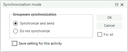
8.2 patch 10
You have an activity series where the individual activities are already created and synchronized with the groupware.
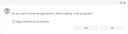
When you now delete the series by removing the series flag at one of the activities, all open activities are deleted. For each activity you get a question if you want to delete it in the groupware too. The same question appears if you modify a series (e.g. the subject) or if you simply delete multiple synchronized activities by hand.
In case of such a delete operation on multiple activities, the message box now shows a checkbox that allows you to apply the answer to all activities.
When you define a standard document for a process you can now in addition to the status define this document for a subtype. The standard document sub list in the process definition now has a new subtype column.
You can select the subtypes that are defined for the current process (at the moment only projects can have subtypes). In case you have selected a specific status for the standard document, the subtype selection may be limited if the status itself is limited to a set of subtypes.
When the status or the subtype of the project is changed, the standard documents with the matching status and subtype are copied/referenced documents with an empty status are only copied during insert. In update mode the status is mandatory. For the subtype a similar logic is implemented. If the subtype is changed during an update, the subtype is mandatory.
This is a bugfix that resulted in a different behavior.
The problem was that in case you have a team and a member of the team is represented by the team (e.g. during vacation). Now the member receives a message. This message is then copied to a team member because of the representation. It could happen that this (random) member was the person itself. Then an endless loop of messages getting copied starts.
The fix changed the logic that all team members now receive a copy of the message as long as they are not currently represented. And as a safety those copied messages will never be copied again.
If you execute a CSV import with the user customizer this may cause problems like a restricted record access. (See variable PSC_MSK_ACC)
You can configure a list of user names in the variable PSA_CSV_IMP_WRN_USR. When a user from this list starts a CSV import (normal, BLOB or batch) a warning is shown with the question if the import should continue anyway.
The standard defines CUSTOMIZER as the user in the variable.
If you have companies with a large organizational structure it is a bit hard to view, search and change this structure in the tree view. Especially if you have more than 1000 subordinated units, not all records are loaded.
With a new toggle button you can now switch the tree view to a list that shows the direct subordinated units. In this list you can search and delete records as in any other list. This makes it easier to maintain the structure.
If a customer has a lot of templates (especially for correspondences), the selection dialog at correspondences or the users template master dialog will display a large tree. This may be a bit too hard to handle.
Now you can set with the variable PSA_RPT_TRE_MAX_RPT an upper limit up to how many templates the tree will automatically fully expand. If this limit is exceeded, only the first level is expanded and the user can drill his way down to the templates by opening only the relevant nodes.
The default limit is 50.
8.2 patch 11
This new feature will enable the users to report issues and suggest features directly from CRM system.
In the help menu is a new function "Report issue/feature" which opens a dialog where the user can enter his depreion.
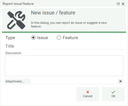
The depreion along with some background information are stored in an admin table (Administration>Test case management>Issues/Features). When this dialog is opened the server collects information about the session and other threads:
This helps during the analysis of issues.
To inform persons about new records an admin can define recipients (Administration>Test case management>Issue/Features recipients). For each recipient it can be configured if the person receives an internal message and/or an email. Furthermore this setting can be distinguished between a issue and a feature report.
The authentication for the Google Maps REST services has changed. Now only an API key is needed. To set this in PisaSales the new variable PSA_MAP_GOG_API_KEY was created.
The old variables PSA_MAP_GOG_CLI_ID and PSA_MAP_GOG_SIG_KEY are not used anymore.
Further information about the configuration in Google can be found in this document.
When you defined a team with the variable PSA_APM_DSP_TEA_NUM to be the default dispatch contact for new appointments, the team was only assigned when the appointment was created in a form.
In case the calendar app or a groupware import created the appointment, no dispatch contact was added.
Now this contact is always added.
During the startup you may want to not register certain web services.
One use case can be the portal. You want to extend the existing web service by adding new endpoints to it. In this case you would create a new web service that inherits from the implementation of the original web service. But you need to use the same path for the end points so the Scrivito app can connect to it. This will cause an error during the startup, because no two endpoints with the same path are allowed.
As a solution we introduced a new server property that defines the names of the web services that should be ignored during startup.
Define the names you want to ignore in the property psc.rst.ign.wsv
Multiple names are separated by a comma.
As an alternative you can use a variable named PSC_RST_IGN_WSV. The settings of the variable overrides the property value.
The end points that are consumed by the Scrivito portal now provide a schema definition. The schema describes the attributes and the possible values for enums.
A documentation on how to implement this feature can be found in the REST API documentation.
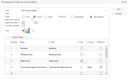
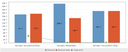
If you want to display certain values in the cockpit filter bar diagram as a line you can now configure a field to be displayed as a line in the chart.
If you want to add functionality to a dialog without linking it or using the global jar hack, you can now use the new dialog interfaces.
These interfaces are available for dialogs (list, form, tree) and selectors.
The idea is that they behave like a listener. You implement a method of the interface and when PisaCubes calls the corresponding method, your method gets called.
There are always two method variants. One that gets called before the PisaCubes code and one that is called after the PisaCubes code.
The available methods include the most common ones:
PscIfcFrm):creDlgfetDatdelDatinsRowputDataboDatPscIfcSel):chkSelDatdelSetDatrfrSelDatsetSelDatThe implementation is defined in a dialog IPL.
In the dialog mask you find the new "Interfaces" tab. Here you can add dialog implementations to the list. The selector shows all implementations that extend PscIfcFrm or PscIfcSel.
The position defines the order in which the interfaces are executed.
The "Before" methods are called in ascending order and the "After" method in descending order.
The interfaces are executed for the dialog where they are defined. This means that an interface can be defined at the base dialog and at the inheriting dialog.
An example of the order of the method calls:
When you define the server property psc.prp.sys.env the server will load system environment variables into the server properties.(The pattern can also be defined with the system environment PscPrpSysEnv) The value of this property is a regular expression which the system environment names must match. For example Psa[ac]+*
If the server finds such a variable the variable name is converted to a property name. For that before each uppercase letter a dot is placed (except for the for letter). Then everything is converted to lowercase. For example PsaTit becomes psc.tit
Then the property is added to the server property as long as it was not already defined by the original server property file. So the property file wins over the system environment.
The use case for this feature is to configure the server inside of a Docker container.
8.2 patch 12
If a new feature or issue was recorded in a customer system the support may want to copy the data to another system. This way the support does not need to access the customer system but can work on the issue/feature in a "local" system.
The Issue/Feature dialog got a new export and import function.
The selected records are exported as a zip file and stored on the client. When the zip is imported in another system, then the imported records are automatically loaded into the mask.
If an internal user posts a new message in the pinboard, all external contacts that collaborate on this project should get an email that there are news. So they don't have to constantly check the portal for any news but will get a notification.
You need to enable this feature for each project process individually by a variable. The variable name starts with PSA_PIN_BRD_SND_EMA_ followed by the process identifier. For example PSA_PIN_BRD_SND_EMA_PSA_SVC_TRB for faults.
Then the contact GIDs are extracted from the pinboard that did a public post. Excluding the user that is currently posting.
Those GIDs are searched in all external contacts that don't have a set mail lock.
The Scrivito template that is used for the mail is defined by the variables starting with PSA_PIN_BRD_SND_EMA_TPL_ and once again ending with the project process ID.
Templates in different languages can be configured by adding the language identifier to the variable name (e.g. PSA_PIN_BRD_SND_EMA_PSA_SVC_TRB_GER). The language identifier of the communication language of the recipient is used.
We export the custom fields name, number and user to the template which are the project name, number and the recipient name. Additional fields can be defined by customizing.
This feature requires Neoletter for sending the emails.
If a customer does not want to use Neoletter it is customizing to implement something other (like SMTP). The responsible class is PsaPinBrdSndEma.
8.2 Patch 13
You can define the allowed origins in the server property psc.rst.aca.ori.
Now you can use wildcards (? and *) in the URL for more flexibility. For example http?://*-scrivito.com. This will match http://alpha-scrivito.com and https://beta-scrivito.com.
In the response the header Access-Control-Allow-Origin will contain the request origin.
You can configure which appointment types will be exported to the planning board. This setting is done with the variable PSA_PLB_ACTIVITY_FILTER.
The format of the variable is like the access string (<positive>!<negative>). If the positive part is empty, all appointment types will be used. The negative part is removed from the positive list.
There are two special keys for defining multiple types:
#PLN for all types that have the plannable flag#FRE for all types that have the free flagExamples:
#PLN: will export only plannable types (this is the default)!#FRE: will export all types except for the free types (like MILESTONE)!HOMEOFFICE,MILESTONE: will export alles types exception for HOMEOFFICE and MILESTONESVC_ACTION,MAINTENANCE_ACTION: will export only SVC_ACTION and MAINTENANCE_ACTIONThe scenario is that you have a Scrivito form that posts the data to Neoletter. PisaSales then imports these form submissions and then can trigger questionnaire actions on this data. For example creating a task.
In PisaSales you have a new list at the questionnaires where you can select a form in an external system (Neoletter). This can be multiple forms for example when you have forms in different languages.
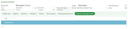
At each question you can enter the name of the form field. The name is searched in the form submission object in the root, then in the details, then the personal_fields and in the end in the custom_fields. You can add the prefix custom_ to the field name in PisaSales to force that the field is only searched in the custom fields.

The job "Neoletter: Leadimport" (PSA_MAI_LEA_IMP) checks if the form_id is associated with a questionnaire. With the job parameter IMP_QST_LEA=y | n it can be controlled if the normal lead contact with the task containing the form data should be created before the questionnaire answers are imported. The default is that they will be created.
The import is done by the class PsaQstExtFrmImp.
For all questions with a form field mapping, the form data is imported and stored as a set of questionnaire answers.
After storing all answers the questionnaire actions and save userexits are triggered.
In case you created a service call in PisaSales (and not in the portal) you may want to publish this ticket so that the customer can view and comment on that ticket in the portal.
To publish a service call you run the function "Public in the portal" at the service call. If the service call is not already published a wizard will open.
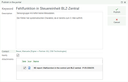
You can edit the keyword and depreion and remove unwanted information. This will be the data the customer will see in the portal.
Also the wizard tries to detect the contact that submitted this call by searching the "Forwarded by" field data in the customer's staff. You can also select a contact by hand. The staff of the customer will be pre-fetched but you can search over all persons.
If you have configured an email template for the service call type you can select if you want to send a notification to the contact about the newly published service call. The configuration is similar to the sending of a notification for a new post. But the variable prefix is PSA_SVC_PUB_SND_EMA_TPL_
In the wizard you can also select documents that will also be published. In the document list all documents with a set web publication flag are shown.
When the wizard is closed with the "Publish" button, the service call get the external portal key set and a new pinboard post with the keyword and description.
The color scheme can only be set for all users. But for color blind users it would be great if the color scheme could be set up for single users or groups and not just for everyone.
We added two new functions in the color scheme dialog to set the selected scheme user or group specific.
The functions open a person or group selection and then sets the color variables for the selection.
You need to ensure that the variable values are set, otherwise the global color would be used. So setting a global red scheme and then trying to set the standard scheme for one user won't work. You have to create a standard scheme with all the variables set to the default value.
8.2 patch 14
You can only export the recipients to an external Mailing system (like Neoletter) if all the email addresses are unique inside of the recipients.
But in case you have many recipients with a lot of duplicates it is a lot of work to delete those by hand.
In the mailing list dialog we already have a function that searches duplicates based on identical contact GIDs. This function is now extended so that a modal dialog appears that asks the user how duplicates should be searched.
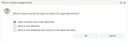
The first option is the old way of searching. Here only references to the same contact with the same email address are found. It is valid to have the same contact with a different email address in case you want to write to the contact over multiple addresses.
The second option only searches for identical email addresses no matter which contact is linked. All contacts with an identical address will be shown.
The third option is similar to the second one except that one record of the duplicates is not loaded into the list. This enables the user to simply delete all findings with a single click.
8.2 patch 14
There may be use cases where you want a Neoletter mailing in PisaSales that was not created in PisaSales. For example a user worked only in Neoletter or you accidently deleted the email in PisaSales.
In the Neoletter admin list (Administration > Activities > correspondences > Neoletter) you have a list of external mailings. You can select one and then call "Import e-mail series".
This will check if a mailing with that ID already exists in PisaSales. If so, the email series will just be opened. If not, a new email series with the subject is created. Then the preview and the response are imported. From the response all recipients are added to the recipients list.
Along with this new feature you can now also import the response for a single email. To do this the email response needs to be empty. When you call "Import response" on such an email all status events from Neoletter are filtered for that particular mailing. Then the response is generated for the email.
The main tab widget has been re-written from scratch. It supports
The rich text editor was completely rebuilt.
Environment values whose name begins with “PISASALES_WEBCLI_” (except those whose name begins with “PISASALES_WEBCLI_LGI_” - see below) are considered to define or override a global configuration setting.
If a date/time field does not provide a full date/time value, but a date only for instance, then the client fills the missing parts with a standard value; the hour is set to 12 local time in order to ensure that the UTC value shows the same date.
But there's some logic in custom environments that rely on the time set to 00:00:00 in this case.
A new environment value “PSA_FMT_DAT_SET_NUL” was introduced. If it is set to “y” then the client sets missing time parts to zero when processing date/time input.
The backend-to-backend connections for Desktop Integration and push notification service now support HTTPS / WSS.
The use of HTTPS/WSS can be configured globally. And there is a Login set option override the global setting for a particular application.
Images (BLOBs) in ICO format are deprecated in version 8.3. The support for this image format will be removed in a future version.
There are several ways to replace those images:
This method is considered to be insecure. Open ID Connect based login should be used instead.