Managing Users

The users of a JustRelate product are the people allowed to work with it. By means of teams, these users can be grouped to reflect your organization’s approach to handling responsibilities. Teams let you grant their members permissions, e.g. regarding their general kind of access to working copies of a specific Web Builder instance.

For users to be able to manage users and teams, they require the “Manage users” permission.
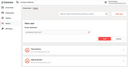
Users as team members

Adding a user

To add a user to your account, open the “Users” section, click “Add user” at the top right, and enter the new user’s email address.

Confirm by clicking the “Add” button. The system then sends the user an invitation email for logging in to one of the account’s instances. After logging in, the user’s name is known to the system and displayed where needed.

User settings and team memberships

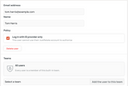
To change a user’s settings, click the corresponding entry on the overview page. This displays the user’s details page.

In the “Policy” section, check “Log in with ID provider only” if you want to prevent the user from logging in to their account using their username and password after their IdP account has been suspended.

In the “Teams” section, you can add the user to and remove them from teams.