After releasing a mailing, a statistics overview is displayed on its view page, giving you a first impression of the reach your mailing has had so far.

Analyzing Mailing Statistics
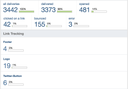
Technically, the following pieces of information are available:
- Delivered: Emails the Amazon server has passed to a receiving mail server.
- Error: Emails not sent as a result of an error.
- Bounced: Emails accepted by the receiving mail server but not delivered to a mailbox. This can be caused by a full mailbox (transient bounce) or by an email address unknown to the server (permanent bounce).
- Spam: Emails marked as spam by the recipient or a spam filter.
- Skipped: Emails not sent as a result of the recipients' missing consent to receiving mailings.
Additionally, the following types of user behavior are recognized if tracked links are used in the mailing content:
- Opened: Emails that were opened, detected by means of a downloaded tracking image or a recipient's click on one of the tracked links inside the email content.
- Clicked on a link: Emails in which at least one of the tracked links contained in the content was clicked.
Details
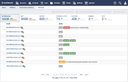
Clicking a figure in the statistics view opens the statistics details page for the mailing concerned. On this page, click one of the figures to narrow down the list of matching deliveries.
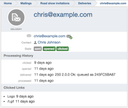
Clicking an email address opens the details page of this individual delivery. The details page lets you examine the delivery and the recipient's click actions.