
In the Designer, there are two ways to select the elements that make up the email concerned:
Selection modes
- The classic selection mode (dark gray outline)

- The “editor” mode (pink outline)

These modes are complementary and save you design time by allowing you to quickly reach and select an element to customize it.
Changing the selection mode
By default, the classic selection mode is activated, and you can enable or disable the editor mode by clicking on the “Editor mode” button present at the top left of the email editing area.
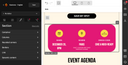
To return to classic selection mode, click again on the “Editor mode” button.
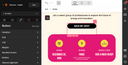
Editor mode is activated: you have direct access to the deepest elements of your section, as well as to intermediate levels (sections, groups and backgrounds).
You can also save even more time by using one of the keyboard shortcuts to switch from one mode to the other:
- Ctrl+Click on PC or Cmd+Click on Mac to directly select an element in your email.
- Ctrl+E on PC or Cmd+E on Mac, to activate or deactivate editor mode.
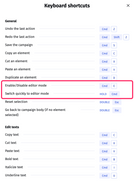
For more information about keyboard shortcuts, see Overview of keyboard shortcuts.
Advantages of the classic selection mode
Classic selection mode lets you take advantage of all the possibilities offered by the Email Builder.
In classic selection mode, you double-click on elements to enter the deeper levels of your email. Conversely, you can go back through the levels by double-clicking outside the elements (double-click on the transparent blue-gray zone).
To navigate through the levels of the email, you can also use the breadcrumb navigation.

The classic selection mode is not the most suitable when the email structure is completed and you need to update texts and images. For this purpose, the editor mode is available.
Advantages of the editor mode
The main advantage of editor mode is to reach deeper content in the email much more quickly. It is particularly useful when the email is already built, and you are looking to edit a text, its parameters, an image, etc. This prevents you from using double-click too ENequently.
Editor mode allows you to benefit from all the possibilities offered by the Email Builder with the exception of adding new elements (text, images, etc.) to the email.
The editor mode is not the most suitable when creating the structure of the email. It is for this reason that the classic selection mode is available.