Editors can now specify the language in which the text on a web page is written.

Scrivito JS SDK 1.22.0 Released – Featuring Language-Aware Search
Posted on April 19, 2021
Introducing language-aware search for better search results
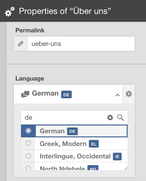
Whether a visitor uses your site search, or an editor uses the search sidebar, Scrivito now takes the language of the documents into account. As a result, language-specific common words (stop words) are ignored, preventing unrelated hits from showing up. Also, stemming is now applied based on the language of the pages, meaning that, for example, singular and plural forms are treated equally, increasing the quality of the search results.
The JavaScript API now also includes an according language() method as well as the _language attribute.

A sidebar for your websites!
Are you managing multiple websites with Scrivito?
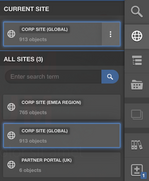
Your sites are now accessible via a dedicated sidebar and no longer via the hierarchy. This helps you keep track of your sites and always have the most recently used ones at your fingertips.
Adding subpages directly
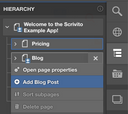
Adding a subpage using the main menu or the submenu in the hierarchy sidebar usually first opens the dialog for selecting the page type. Now, if, due to page type restrictions, only a singe type is available, the dialog is not opened anymore but, for your convenience, the menu item lets you add such a page directly.
More meaningful page titles for editors
In previous versions, the editing configuration of an object or a widget class allowed you to customize the title their instances should have in the Content Browser and in properties views. For this, the titleForContent callback can be provided.
Sometimes, for example with homepages, a label meaningful to editors cannot be derived from the visible content alone. For handling such cases, Scrivito introduces a new attribute convention: contentTitle.
As a default, i.e. if no callback has been provided, titleForContent now first looks for a contentTitle, and then, if it’s empty, for a title string attribute. This makes it possible to provide a custom title for editors (contentTitle) as well as the regular title to be displayed to visitors (title).
API for retrieving the current working copy’s ID and title
To better support customizing Scrivito’s editing interface, the SDK now includes an API for retrieving the ID and the title of the current working copy, Scrivito.currentWorkspace().