Scrivito now lets editors revert the changes made to individual widgets. For this, corresponding menu items are available in the respective widget menus. Furthermore, in the “Changes” view mode, a deleted widget can now be restored to its published version if available.

Scrivito JS 1.6.0 – More Editing Tools & Progressive Image Loading
Posted on May 14, 2019
Major improvements
Reverting changes and restoring widgets

Replacing images and other binaries made easy
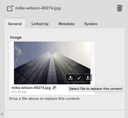
Sometimes, images need to be updated – wherever they are used on the website, once or multiple times, the new versions should be displayed in place of the outdated ones.
We have made that exponentially easier for your editors. Now, editors can just find and select the image in the Content Browser and then drag and drop the replacement image onto the preview of the current one. The filename and the metadata of the image object will be updated as well; other attributes aren’t touched. That’s it, no longer is there a need to create a new image object and update all the pages which reference it!
By the way, the same also applies to other binaries like PDF files.
Improved working copy ordering in the sidebar
Like us, a good deal of our customers
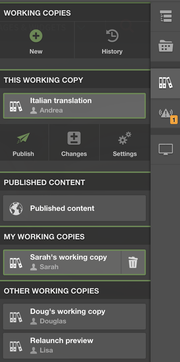
To improve the usability of the working copy list, we’ve added another group to it, “My working copies”, in which only those working copies show up that are (co-)owned by the current user. The “Other working copies” group is still there but is visible to chief editors and admins only. The new “My working copies” group is, of course, sorted alphabetically as well.
Also, for consistency, the selected working copy now remains in its list.
In-place editing for rel attribute values

For even more convenience when editing text in place, Scrivito’s link editor has been extended so as to support setting the contents of a link’s rel attribute. The purpose of this attribute is to instruct search engines regarding the treatment of the link and its destination. To do this, after selecting text and choosing the link icon, just click the gear icon at the top right and tick the desired keywords to be included in the attribute value.
Progressive background image loading
To improve visitor experience in low-bandwidth situations, the Scrivito.BackgroundImageTag component now loads background images progressively if they haven’t been transformed. This lets the visitor initially see at least a low-resolution version of the background image – instead of no image at all.
Once loading the high resolution image in the background has finished, it replaces the smaller low resolution version. With speedy connections, the visitor will hardly notice a difference.
Further improvements and changes
Fetching all search results: ObjSearch#toArray
Search query instances now have a method for fetching all search results, toArray(). Previously, one had to use the spread operator to convert the search results to an array, like in a = [...Scrivito.Obj.all()]. This can now be written as a = Scrivito.Obj.all().toArray().
Scrivito.LinkTag supports URL parameters
The Scrivito.LinkTag React component now allows you to pass the params prop to it for having URL parameters rendered.