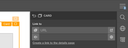
After introducing details pages for data items in version 1.36.0 of the Scrivito SDK, the editing interface now offers you to create such a page for a given data class directly from within a data item.
If, for example, you have a card widget in your data list widget, and this card widget has a link attribute, you can have the details page and the link to it created by simply clicking “Create a link to the details page” in the card widget’s properties. If the details page for the items of the data class concerned already exists, it is automatically assigned to the link, of course.